

Windows Maintenance Tool update adds Startup and Restore upgrades, plus a new My Device dashboard for Windows 11

An unofficial Windows-Maintenance-Tool update is drawing attention from Windows 11 users who want a simpler way to manage startup items, restore points, and routine system tuning without digging through multiple built-in menus.
The open-source project, often shortened to WMT, is distributed through GitHub and is built around PowerShell scripts aimed at common maintenance tasks. Its latest release focuses on UI cleanup, reliability fixes, and broader controls for day-to-day troubleshooting.
Startup controls get a full rebuild
WMT’s Startup Manager has been rewritten with a cleaner interface and expanded functionality. Users can more directly manage startup entries and services, with improved handling of registry and directory locations to make boot behavior easier to understand.
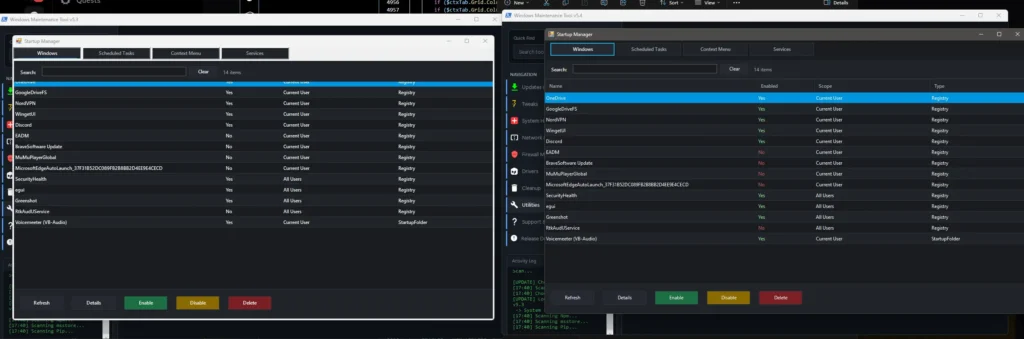
The update also targets quality-of-life issues, including smarter refresh behavior and context menu access. These tweaks are meant to reduce confusion around what is actually launching at sign-in and where the entries originate.
Restore Manager adds clearer actions
The redesigned Restore Manager adds buttons for enabling or disabling system protection, creating and restoring points, and deleting older restore points. It also surfaces clearer error messaging when deletions fail, helping users diagnose permission or configuration problems.
Some legacy scheduling-related functions have been removed in favor of tighter alignment with Windows’ current management approach. The goal is a more predictable restore workflow without relying on older Task Scheduler hooks.
A new My Device page arrives
A new My Device page rolls system specifications and driver version details into one view, alongside quick-access maintenance options such as defragmentation, trimming, and RAM cleaning. It also includes shortcuts intended to make driver checks easier while reducing dependence on extra third-party utilities.
The release includes additional performance and usability updates, such as expanded search behavior and interface refreshes. The project’s launcher and GUI scripts also add update checks and improved handling for paths containing spaces or parentheses, a common source of script failures.